Verdict
With three distinct tracking methods, improved wireless mic compatibility and full 360º rotation, the Osmo Mobile 8 builds on the already impressive formula laid down by the Osmo Mobile 7P. It’s tremendous value for money, too.
Pros
-
Apple DockKit support added -
Tracks pets via Multifunctional Module -
360º infinite rotation -
Good value for money
Cons
-
Not officially available in the US
Key Features
-

Review Price: £135 -
Multifunctional Module
Adds fill light, DJI microphone integration and subject tracking -
Apple DockKit compatible
Tracks using third-party iOS camera apps -
360º tracking
Improved design rotates completely -
Wireless mic support
Compatible with DJI Mic 3, Mic 2 and Mic Mini

Introduction
The DJI Osmo Mobile 7P really impressed me when I reviewed it earlier this year, and essentially reclaimed DJI’s position at the top of the portable smartphone gimbal market.
Now, the company has followed it up with the Osmo Mobile 8 – and while it might look largely the same, there are some genuinely useful upgrades under the hood.
Given that it costs the same as the OM 7P when it launched, surely the OM 8 is the new go-to folding gimbal for on-the-hoof content creators? Let’s find out.
Price
Bucking recent inflationary trends, the DJI Osmo Mobile 8 costs the same as its predecessor, which means it’s actually become better value, given the upgrades it brings.
The Osmo Mobile 8 retails from £135 in a package that includes the gimbal itself, a magnetic clamp, the Multifunctional Module and a fabric bag for storage. There’s also a bundle with a single DJI Mic Mini transmitter available for £165.
Unfortunately, following the pattern of other recent DJI launches, the Osmo Mobile 8 is not being officially released in the United States.
Design and Handling
- Familiar folding design with magnetic clamp
- Integrated extension rod and mini tripod
- Multifunctional Module included
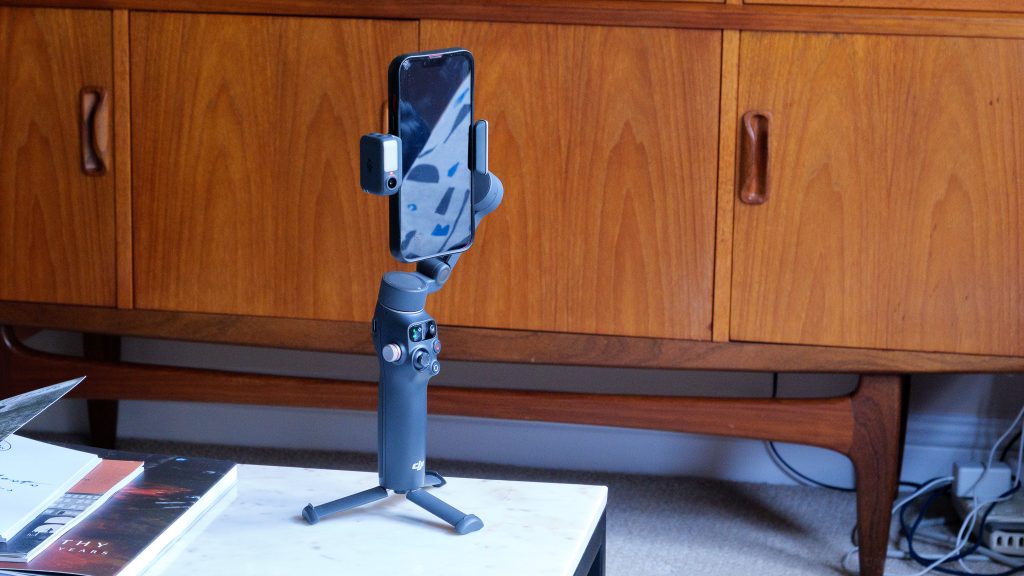
If you’ve used any recent compact smartphone gimbal, the Osmo Mobile 8 will feel immediately familiar. The design is pretty much identical to the Osmo Mobile 7P – which is no bad thing in my book, given that it’s one of the most portable and comfortable-in-the-hand smartphone gimbals I’ve tested.
It packs down to just 190 x 95 x 46mm when folded, weighs 370g with the module and will fit comfortably in a larger coat pocket or small bag. The gimbal arm powers on automatically when pulled out, making deployment quick and simple. Smartphones mount via a magnetic clamp able to clasp around any handset between 67 and 84mm wide, 170 to 300g in weight and 6.9 to 10mm thick. This covers most mainstream phones, though I’d note that it’s not quite as accommodating as something like the Hohem iSteady V3, which can handle larger devices.
The magnetic clamp is easier to use than a permanently fixed mount, and the gimbal arm includes a USB-C output allowing you to charge your phone from the stabiliser’s own battery – a handy feature for longer shooting sessions.

Concealed within the handle is a pull-out extension rod that adds up to 215mm of extra distance between you and your phone. I found this particularly valuable for self-shooting, as it allowed me to get more into the frame without resorting to an ultra-wide lens. There’s also a plastic mini tripod that folds out from the handle for setting up the stabiliser on a flat surface for hands-free use, plus a standard tripod thread on the bottom if required.
The handle felt comfortable in my hand during testing, with all the main controls reachable with just my right hand. The front-mounted trigger offers various functions, including the ability to rotate the phone 180º or turn tracking on and off.

There are dedicated buttons to stop/start recording and flip between front and rear-facing cameras, plus a mini joystick for manual gimbal control and a mode button to cycle through the four follow modes. A wheel on the left side controls focus and zoom – or you can push it in to turn the Multifunctional Modules LED light on and off.
Tracking
- ActiveTrack 7.0 in DJI Mimo app
- Apple DockKit support for third-party iOS apps
- 360º infinite tracking now supported
The headline feature of the Osmo Mobile 8 is its triple threat of tracking options, making it arguably the most versatile smartphone gimbal when it comes to keeping subjects in frame.
DJI’s Mimo mobile app remains the gold standard for tracking when you want the most advanced features. ActiveTrack 7.0 supports multi-person tracking, continuous tracking while zooming and the ability to set a tracked subject’s position within the frame rather than just keeping them centred. In my testing, it was responsive and reliable, handling quick movements with ease.

The Multifunctional Module – which clips onto the magnetic clamp and can face towards or away from the gimbal operator – adds hardware-based tracking that works with any camera app. Its built-in camera recognises people using AI and moves to keep them centred in the frame. What’s new with the Osmo Mobile 8 is that it now also tracks cats and dogs, which will be a boon for pet content creators. I found it impressively responsive when following movement, though it doesn’t support the advanced features of ActiveTrack 7.0.
The Module also serves as an LED fill light – and it’s surprisingly bright for such a tiny unit. Additionally, it can now wirelessly connect to the DJI Mic Mini, Mic 2 and Mic 3 (the Osmo Mobile 7P’s Module only worked with the Mic Mini), and can even connect to two microphones simultaneously.
New to the Osmo Mobile 8 is Apple DockKit compatibility, which enables native tracking in hundreds of third-party iOS camera apps including Instagram, TikTok and many others. This brings real versatility for iPhone users who prefer to shoot directly in their favourite social media apps rather than importing footage later.

Between these three tracking methods, the Osmo Mobile 8 offers something for everyone. Android users are covered by the Module’s hardware tracking, iOS users get both that and DockKit support, and everyone benefits from the advanced capabilities of the Mimo app when they need them.
Another upgrade over the Osmo Mobile 7P is 360º horizontal rotation, allowing the gimbal to track a subject infinitely as they circle around it. This was one of the few areas where rivals like the Insta360 Flow 2 Pro had an edge, so it’s good to see DJI keeping pace.
The only limitation I can see is that the magnetic clamp might not accommodate every setup – if you’re using bulky cases or bolt-on lenses, you might need to look at a heavier-duty gimbal like the Hohem iSteady M7. But for standard smartphone use, this is excellent.
Stabilisation and Performance
- No manual balancing required
- Four preset gimbal modes
- Up to 10 hours of battery life
As with the Osmo Mobile 7P, the Osmo Mobile 8 automatically balances mounted phones as long as the clamp is positioned correctly. If you’ve spent far too long fumbling with gimbal sliders in the past, this simplicity is wonderfully refreshing.
Stabilisation is excellent. The four preset modes offer a nice range of movement types that will cover the vast majority of scenarios a smartphone content creator might encounter. Pan Follow locks the tilt and roll axes while following horizontal movements; Pan Tilt Follow adds tilt movement to that; FPV copies motion across all three axes for more dynamic footage; and SpinShot allows for almost full rotation of the roll angle for creative shots.
These modes help to achieve impressively smooth, stable footage while shooting one-handed, even while walking or running. I tested the Osmo Mobile 8 both indoors and outdoors with my iPhone 13, using various apps including the native camera app, DJI Mimo and Instagram, and the stabilisation performance was consistently excellent.
The integrated rechargeable battery delivers up to 10 hours of use in ideal conditions. However, with the Multifunctional Module’s tracking and LED light active, this drops to around four hours. For longer shooting days, you may need to pack a charger or power bank for topping up.
Should you buy it?
You want tracking versatility
With three distinct tracking methods covering every scenario, this is the most flexible smartphone gimbal for keeping subjects in frame.
Your phone is large or modded
Larger, heavier or modified smartphone are better suited to a heavy-duty stabiliser like the Hohem iSteady M7.
Final Thoughts
The DJI Osmo Mobile 8 is an impressive evolution of an already excellent smartphone gimbal. By adding Apple DockKit support and 360º tracking while expanding the Multifunctional Module’s capabilities, DJI has created arguably the most versatile compact smartphone stabiliser on the market.
It doesn’t reinvent the wheel – the design, controls and core stabilisation performance are largely unchanged from the 7P – but that’s fine, because those elements were already excellent. What it does do is address the limitations of its predecessor while keeping the price the same, making it exceptional value for money.
If you already own an Osmo Mobile 7P or a rival gimbal from Hohem or Insta360, I wouldn’t say it’s worth upgrading immediately. But if you’re buying your first smartphone stabiliser, or if you already own DJI wireless microphones and want seamless integration, the Osmo Mobile 8 is an easy recommendation.
Trusted Score
How We Test
We test gimbals thoroughly, filming in a variety of conditions to give us the best possible test results.
- Experimented with the different tracking and follow modes
- Tested the Multifunctional Module
 OM System OM-1 Mark II Review
  Akaso 360 Review
  Insta360 Go Ultra Review
  Canon PowerShot V1 Review
  Sigma BF Review
  Bosch Tassimo Finesse Friendly Review
  Oppo Find X9 Pro Review
  SteelSeries Arctis Nova Elite Review